Day 14: Set Up and Walk Through Gemini Notebook
What you will learn and leave with
This lesson focuses on set up and walk through gemini notebook. It uses Gemini Notebook as a practical context while keeping privacy, accuracy, context, and human judgment in charge.
Use this when: you need a practical, reviewable next step. By the end: you will save How I Might Use Gemini Notebook note.
Source check: product features and interfaces can change. Gemini Notebook Help Center was checked for this course on 2026-08-19; confirm current details before using a changing feature.
Listen to the Day 14 Introduction
This short audio introduces the day and what to focus on.
Day 14: Set Up and Walk Through Gemini Notebook audio transcript
Sometimes you do not want AI to answer from the whole internet. You want it to stay close to the sources you chose.
That is where Gemini Notebook becomes useful.
Welcome to Day 14 of the 30-Day AI at Work Challenge: Set Up and Walk Through Gemini Notebook.
Today is a setup day, but the setup has a clear purpose. You are learning how to create a notebook, add safe sources, ask source-grounded questions, and notice what the notebook can and cannot answer.
Here is the main idea. Gemini Notebook works best when the source boundary is clear. The notebook should answer from the material inside it. If the source set is weak, outdated, unrelated, or unapproved, the answers can still sound confident, but they will not be reliable.
That is why source selection is the real skill today.
You might use Gemini Notebook for onboarding to a topic, reviewing trusted documents, creating summaries, building FAQs, or preparing a briefing. But you should not treat it as complete just because it is source-grounded. It only knows what you put in the notebook.
In the lesson, you will create or inspect one safe notebook and ask a source-grounded question. Then you will save a note about what worked, what did not, and what you need to be careful about.
Before you move in, think of one topic you may need to revisit. What sources would actually belong together? What should stay out?
By the end, you will save a "How I Might Use Gemini Notebook" note. Tomorrow, that can become a first notebook plan with a topic, a source boundary, and two useful questions.
Learn how to work from trusted sources, build topic-based notebooks, and create grounded summaries and briefings.
This stretch is about source-grounded learning. Instead of asking AI to answer from everywhere, you will practice building notebooks around selected material and using those sources to create summaries, glossaries, FAQs, briefings, and a simple learning system.
Why It Matters
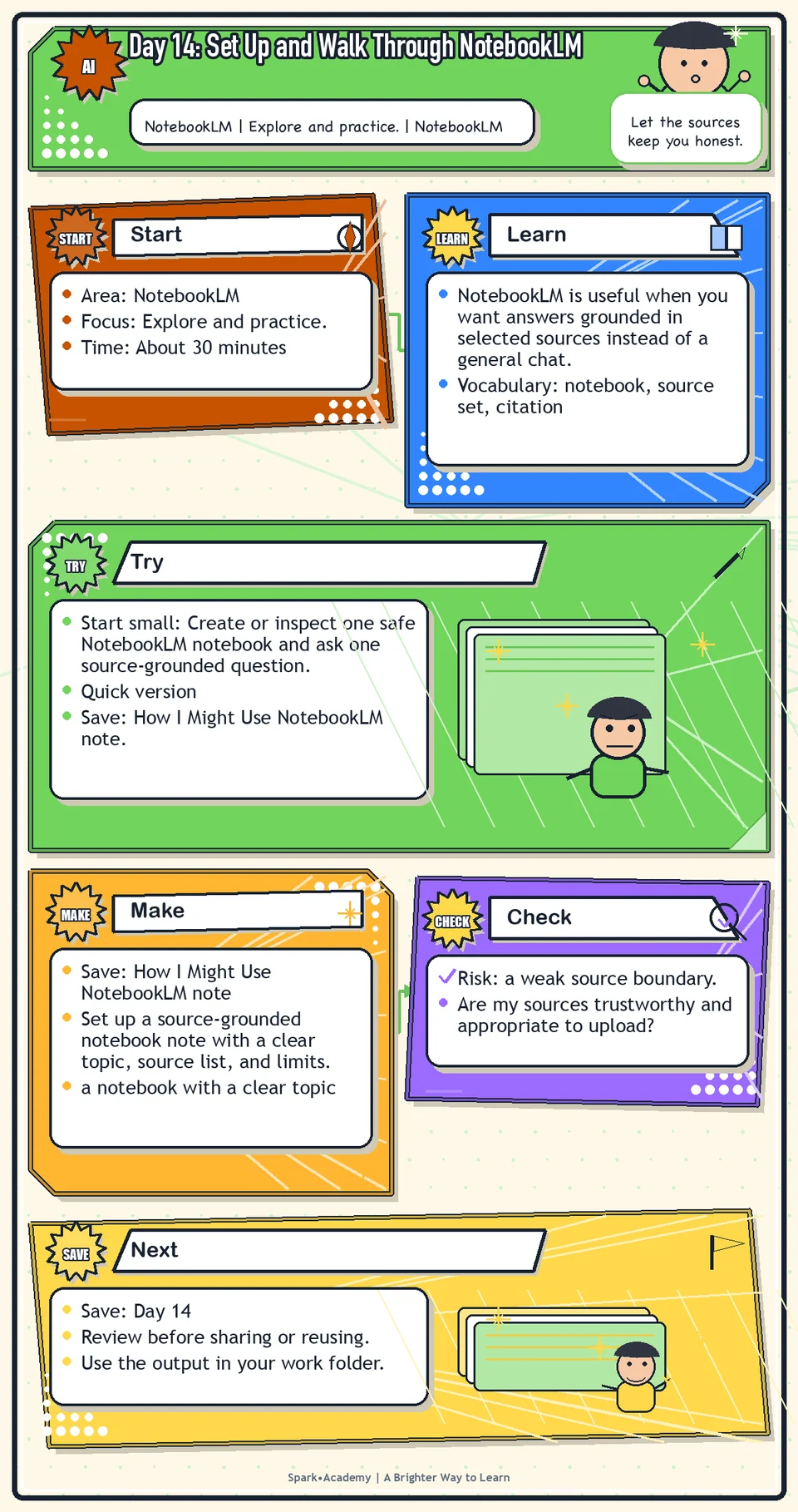
Gemini Notebook is useful when you want answers grounded in selected sources instead of a general chat. The value comes from choosing the source set intentionally and understanding what the notebook can and cannot answer.
Use a safe test notebook to learn the basics: add sources, ask questions, inspect answers, save notes, and notice where citations or source boundaries matter.
Save setup notes that name the notebook topic, source list, useful questions, and limits. The notes should help you distinguish source-grounded learning from general AI assistance.
Know Before You Try
Tool: Gemini Notebook. Start by reviewing the Gemini Notebook entry in The Tools, then open Gemini Notebook if it is available in your account. Use the Tools section as the main reference for access links, supported source types, account differences, and current notes. Today, focus on creating a safe test notebook and noticing how source-grounded answers behave.
Features may vary by account, plan, workspace settings, device, and workplace permissions. Only add public, mock, sanitized, or approved sources. Before uploading workplace documents, slides, audio, videos, or links, confirm they are allowed for this use and always check citations before relying on an answer.
Gemini Notebook is most useful when you want to work from a specific set of sources. Instead of asking the open web, you build a notebook around trusted materials and ask questions inside that context.
The key concept is the source boundary. A notebook should answer from the materials you provide, which helps keep learning close to the selected sources instead of drifting into general AI guesses.
The boundary is helpful, but it is not magic. Incomplete, outdated, biased, or low-quality sources can still produce weak answers. Source-grounded does not automatically mean true, complete, or approved.
A good notebook has three ingredients: a focused topic, appropriate sources, and questions that fit those sources. If the topic is too broad, answers scatter. If the sources are thin, answers will be thin.
For workplace communication, Gemini Notebook is useful when you need to understand a product, policy, rollout, article, brief, or background topic without mixing it with unrelated information.
The practical habit is to verify important answers against the cited or underlying material and mark assumptions, gaps, outdated sources, and review needs.
Before you try
- Gemini Notebook is different from a general chatbot because the notebook is built around sources you choose. That makes source selection the main skill.
- A notebook can include materials such as PDFs, websites, YouTube videos, audio files, Google Docs, and Google Slides, depending on current product support and account settings.
- Grounded citations are helpful, but they are not magic. Follow the citations back to the source before relying on a summary or quote.
Where this helps
Use Gemini Notebook for getting oriented, workplace research, project context, competitor understanding, workplace messaging, domain AI learning, or source-based briefing preparation.
- you need to study a defined set of trusted sources
- you want summaries, FAQs, glossaries, or study aids based on those sources
- you need to separate source-based learning from open-ended brainstorming
Try It
Start small: Create or inspect one safe Gemini Notebook notebook and ask one source-grounded question.
Quick version
- Save: How I Might Use Gemini Notebook note.
- Minimum useful version: Create or inspect one notebook, add safe source material, and write three ways it could help you learn from sources.
- If stuck: Use a public article, help page, or approved practice material instead of workplace content.
- Done when: You can explain the notebook's source boundary and what still needs checking in the original source.
- Add only if useful: Add three questions the notebook is well suited to answer.
Aim for
- Notebook topic: Work Reference.
- Source boundary: Public help page, approved practice material, or approved internal reference only.
- Useful question: "What are the main terms or concepts I should understand from these sources?"
- Verification note: "Check important details in the original source before using them in a work message."
Practice
Open Gemini Notebook. Create a notebook called "Work Reference." Find:
- Where to add sources.
- Where to ask questions.
- Where to save notes.
- Where to generate summaries.
- Where to generate learning aids.
Create a note called "How I might use this." In that note, write three possible getting oriented uses and one thing you should be careful about before adding workplace material.
Work in passes:
- Create a notebook around one safe topic.
- Add one to three safe sources.
- Ask a simple question about what the sources say.
- Create a note about what Gemini Notebook did well and what still needs your review.
If you do not have sources, use public pages, a harmless PDF, or your own mock notes. Avoid private workplace documents unless you know they are approved for this use.
Before you save it:
- Create one notebook with a clear purpose and only a few safe sources.
- Ask one broad question and one source-specific question, then inspect the citations for both answers.
Prompt
Primary Prompt
Use this to get a first useful draft.
Help me create a Gemini Notebook getting oriented plan. Suggest what sources might belong in a Work Reference notebook, what questions I should ask, and what I should be careful about before adding workplace material.Role:
Act as a source-grounded learning coach.
Task:
Help me create a Gemini Notebook getting oriented plan. Suggest what sources might belong in a Work Reference notebook, what questions I should ask, and what I should be careful about before adding workplace material.
Context:
- Keep in mind: Gemini Notebook is strongest when the notebook is built around trusted sources and questions stay inside that source boundary.
- Work context: Gemini Notebook setup and source-grounded learning.
- Save as: Gemini Notebook getting oriented plan.
Use these details if I provide them:
- Safe topic.
- Source types.
- What I need to learn.
- Approval boundaries.
Ask first only if needed:
- Ask up to three clarifying questions only when missing details would materially change the answer. Otherwise, proceed with clearly labeled assumptions or placeholders.
Keep it safe:
- Use only mock, public, sanitized, or workplace-approved information. Do not include sensitive, confidential, personal, customer, legal, financial, unreleased, private-code, credential, or regulated material unless that use is explicitly approved.
- Do not invent names, dates, metrics, source content, evidence, approvals, or promises. If details are missing, use labeled placeholders or a brief mock example.
How to work:
- Plan a small, trustworthy notebook.
- Suggest sources, questions, notes, and cautions.
- Emphasize citation checks.
Give me:
1. Notebook purpose
2. Sources to add or avoid
3. Questions to ask
4. Notes to save
5. Citation checks
Style:
- Practical, clear, friendly, plain-English, specific, and non-hype.
- Use headings, bullets, or a compact table when that makes the output easier to scan.
Before you finish:
- The plan should help me build a small notebook I can trust.
- Make sure the answer is usable, grounded in provided or clearly labeled mock information, and clear about what needs human review before real use.Improve Prompt
Use this to strengthen the source plan.
Review my Gemini Notebook getting oriented plan. Identify sources that may be too broad, private, stale, duplicate, or unapproved. Suggest better source categories, safer practice sources, and citation checks to perform.Role:
Act as a source-boundary reviewer who checks whether notebook sources are focused, approved, current, and useful.
Task:
Review my Gemini Notebook getting oriented plan. Identify sources that may be too broad, private, stale, duplicate, or unapproved. Suggest better source categories, safer practice sources, and citation checks to perform.
Context:
- Keep in mind: Gemini Notebook is strongest when the notebook is built around trusted sources and questions stay inside that source boundary.
- Work context: Gemini Notebook setup and source-grounded learning.
- Save as: Gemini Notebook getting oriented plan.
Use these details if I provide them:
- Safe topic.
- Source types.
- What I need to learn.
- Approval boundaries.
Ask first only if needed:
- Ask up to three clarifying questions only when missing details would materially change the answer. Otherwise, proceed with clearly labeled assumptions or placeholders.
Keep it safe:
- Use only mock, public, sanitized, or workplace-approved information. Do not include sensitive, confidential, personal, customer, legal, financial, unreleased, private-code, credential, or regulated material unless that use is explicitly approved.
- Do not invent names, dates, metrics, source content, evidence, approvals, or promises. If details are missing, use labeled placeholders or a brief mock example.
How to work:
- Review source choices for breadth, privacy, staleness, duplicates, and approval risk.
- Suggest safer source categories.
- Add citation checks.
Give me:
1. Quick verdict
2. Issue table with priority, evidence, and recommended fix
3. Revised draft or targeted rewrite
4. Questions or approvals still needed
5. Before-use review checklist
6. Reusable review prompt pattern
Style:
- Practical, clear, friendly, plain-English, specific, and non-hype.
- Use headings, bullets, or a compact table when that makes the output easier to scan.
Before you finish:
- The plan should help me build a small notebook I can trust.
- Make sure the answer is usable, grounded in provided or clearly labeled mock information, and clear about what needs human review before real use.Apply Prompt
Use this to plan one notebook.
Ask me for a safe learning topic and what I need to understand. Then design a Gemini Notebook notebook with source types to add, questions to ask, notes to save, and cautions before using workplace material.Role:
Act as a practical Gemini Notebook coach who helps me design a focused notebook around trusted source types.
Task:
Ask me for a safe learning topic and what I need to understand. Then design a Gemini Notebook notebook with source types to add, questions to ask, notes to save, and cautions before using workplace material.
Context:
- Keep in mind: Gemini Notebook is strongest when the notebook is built around trusted sources and questions stay inside that source boundary.
- Work context: Gemini Notebook setup and source-grounded learning.
- Save as: Gemini Notebook getting oriented plan.
Use these details if I provide them:
- Safe topic.
- Source types.
- What I need to learn.
- Approval boundaries.
Ask first only if needed:
- Ask up to three clarifying questions only when missing details would materially change the answer. Otherwise, proceed with clearly labeled assumptions or placeholders.
Keep it safe:
- Use only mock, public, sanitized, or workplace-approved information. Do not include sensitive, confidential, personal, customer, legal, financial, unreleased, private-code, credential, or regulated material unless that use is explicitly approved.
- Do not invent names, dates, metrics, source content, evidence, approvals, or promises. If details are missing, use labeled placeholders or a brief mock example.
How to work:
- Ask for topic and learning need.
- Design a notebook with source types, questions, notes, and cautions.
- Use only safe or approved material.
Give me:
1. Questions to ask me first
2. Safe assumptions if I do not answer yet
3. Adapted Gemini Notebook getting oriented plan
4. Review before real use
5. Reusable prompt pattern
Style:
- Practical, clear, friendly, plain-English, specific, and non-hype.
- Use headings, bullets, or a compact table when that makes the output easier to scan.
Before you finish:
- The plan should help me build a small notebook I can trust.
- Make sure the answer is usable, grounded in provided or clearly labeled mock information, and clear about what needs human review before real use.Make Something Useful
Set up a source-grounded notebook note with a clear topic, source list, and limits.
Save How I Might Use Gemini Notebook note.
Make sure it includes:
- a notebook with a clear topic
- safe source material
- a short note about what Gemini Notebook answered well
- a note about what you still need to verify or ask next
Use tomorrow: Choose one safe source set you expect to revisit and create a first notebook plan with the topic, source boundary, and two questions you would ask before a meeting.
Review and Save
Specific risk to check: The risk today is a weak source boundary. A notebook with unrelated, outdated, or unapproved material can make source-grounded answers look more trustworthy than they are.
Make sure each notebook has a clear purpose. A notebook with too many unrelated sources becomes harder to trust and use.
Ask yourself:
- Are my sources trustworthy and appropriate to upload?
- Did the answer stay close to the sources?
- What source gaps might affect the answer?
- Would I need to check the original source before using this in real work?
Watch for
Gemini Notebook is only as useful as the sources you add. If the source material is outdated, incomplete, or biased, the notebook output will reflect that.
Source-grounded does not mean automatically perfect. You still need to read important source passages yourself, especially before using the information in a sensitive or publicly visible context.
Save
Save this in your 30-day work folder as Day 14 - How I Might Use Gemini Notebook note.
Add a quick reuse note: Use this at work for: building a source-grounded notebook for onboarding, product learning, policy review, or domain orientation.
Save your setup note with the notebook topic and source list. That helps you remember what the notebook can and cannot answer.
Check yourself
- I opened Gemini Notebook.
- I created or explored a notebook.
- I know where to add sources.
- I know where to ask questions.
- I know where to save notes.
- I understand that Gemini Notebook is strongest when the source material is strong.
- I can explain why Gemini Notebook is useful when I want answers grounded in selected sources.
- I can create a source-grounded notebook with a clear boundary and useful questions.
Optional video
Watch: Meet Gemini Notebook: Research, Reimagined (official Google Workspace YouTube channel, 5:04).
Why it helps: It gives a clear official overview of Gemini Notebook as a source-grounded research and learning tool.